Story + step-by-step manual. Continued from Parts [1] and [2].
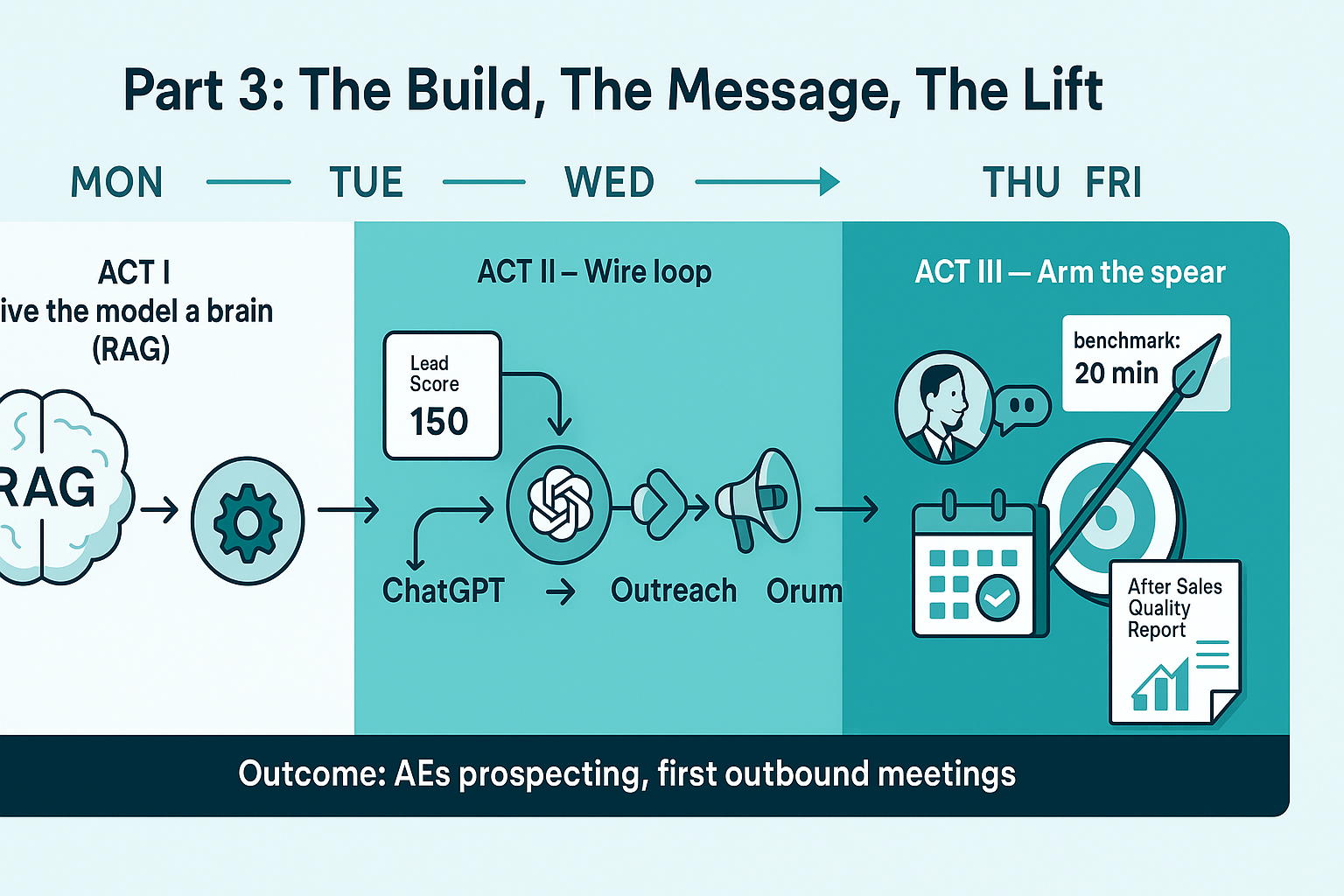
Act I — Monday: Give the model a brain (RAG), not a hunch
Story: We started the week with a CRM full of names and no direction. The promise to the team: “By Friday, you’ll know exactly who to call and what to say.”
What you do (how-to):
- Create your rulebook doc (the “brain”).
Put this in a single document you control (Google Doc/Notion/MD file):- ICP tiers: HIGH (post-sale owners), MEDIUM (adjacent influencers), LOW (upstream/plant/dealer).
- Scoring rubric:
+100Golden Account,100/50/0for title/function, +intent boosts. - 20 labeled examples (title → score + 1-line rationale).
- Embed it for Retrieval-Augmented Generation (RAG).
- Chunk the doc (≈500–1,000 tokens).
- Store embeddings in a vector DB (Supabase/Pinecone/Weaviate).
- Retrieval params:
top_k = 3–5, cosine similarity.
- Define the classifier contract.
The model must return JSON only:

Why this matters: RAG stops guesswork. Every decision pulls the same rulebook before the model scores a contact—consistent, updatable, explainable.
Act II — Tuesday: Wire the loop (HubSpot → RAG → ChatGPT → HubSpot)
Story: By day two, we connected the plumbing so AEs would stop guessing and start dialing.
What you do (how-to):
- Add three HubSpot properties
is_golden_account(Company · Checkbox)pqd_job_title_score(Contact · Number)pqd_lead_score(Contact · Number)
- Create a Contact-based workflow (triggers):
- On Contact Created OR Job Title changes OR Company association changes.
- Custom code action (Node/Python) — skeleton

4. Auto-action by score
- If
pqd_lead_score ≥ 150→ auto-enroll in Outreach sequence. - If
100–149→ add to nurture task list. - Else → park with a research task.
Why this matters: The loop makes the decision in real time and hands reps a prioritized list. No pep talk required.
Act III — Wednesday: Arm the spear (the message)
Story: Mid-week, the first calls sounded different because the message fit the persona.
What you do (how-to):
- Fast persona matrix → openers PersonaOne-liner openerAsset/CTAWarranty/Field Quality (HIGH)“We flag in-fleet issues in days, not months, shrink campaign scope, and verify fixes VIN-by-VIN.”After-Sales Quality Report + 20-min benchmark inviteOTA/Connected-Vehicle (HIGH)“Catch post-release regressions and prove post-fix stability within days.”Benchmark their last OTA rolloutRegulatory/PRO (HIGH)“Gain lead-time and precision to make faster recall vs. campaign calls.”Lead-time/campaign-size case studySDV/Software Quality (MEDIUM)“Spot <0.01% silent failures after firmware changes.”Short tech deep-diveSupplier/Launch/Plant (LOW)Nurture onlyTopical newsletter
- Email + LinkedIn templates (drop-in)
- Benchmark invite (build-vs-buy safe):
“Bring one recent field issue or OTA release. In 20 minutes we’ll show how our anomaly signatures would have surfaced it earlier and reduced the campaign footprint.” - Connect (≤300 chars):
“We analyze ~5k recalls & 30k complaints to find post-sale issues in days, not months. Worth a 15-min walkthrough on shrinking campaign scope?”
- Benchmark invite (build-vs-buy safe):
- Make the report your spear tip
Use your After-Sales Quality study as proof (grounded in recall/complaint datasets). Always link it in High-fit outreach.
Why this matters: When title and talk track align, responses jump—and “we build in-house” becomes a comparison, not a brush-off.
Act IV — Thursday/Friday: Go-live, measure, tighten
Story: By Friday, they booked the first cold meetings ever. Not luck—tight feedback.
What you do (how-to):
- Pilot with 25–50 contacts
- Manually spot-check score + rationale.
- Fix obvious misses (e.g., “Quality Engineer” → plant vs. field disambiguation) by adding examples to the rulebook.
- Instrument the lift
- Leading: % High-fit in active queue, connect rate, reply rate, booked meetings.
- Lagging: win rate by fit tier, cycle time to Stage 2, pilot rate.
- Close the loop (weekly)
- Export overrides (“rep disagreed”) → add good ones to few-shot examples.
- Re-embed the rulebook (RAG) — no retraining required.
Why this matters: Tiny weekly updates keep the classifier aligned with reality, so precision compounds.
System prompt (classifier):

RAG retrieval tip:
Query with: "{Title}" + "{Company}" + ("warranty" OR "field quality" OR "OTA" OR "connected vehicle") to bias toward the right snippets.
HubSpot properties to create:
is_golden_account(Company · Checkbox)pqd_job_title_score(Contact · Number)pqd_lead_score(Contact · Number)- (optional)
pqd_rationale(Contact · Single-line text)
Troubleshooting (fast)
- Too many “Quality Engineer = High” → Add examples that mark Supplier/Launch/Plant QE = 50 or 0.
- Hallucinated rationales → Lower temperature to
0.1and ensure only top-K snippets are injected. - AEs still not prospecting → Auto-enroll High-fit in Outreach, and put a daily Orum call block on the calendar.
- Bounce/relevance issues → Stop raw dumps; enrich with intent (report downloads, webinar attendees) before scoring.
The Lift (what success looked like)
- Week 1: cleaner lists, High-fit personas at the top, AEs actually prospecting.
- Weeks 2–3: first outbound meetings ever with the right OEM stakeholders.
- Ongoing: “We’re building in-house” → benchmark invitation instead of a dead end.
That’s the whole arc: codify your ICP → retrieve it on every decision → return score + why → act automatically.
When the brain is right, the pipeline follows.